What is a Best Internet Speed for Gaming? Ideal Speed for Different Devices
Quick Summary
Test your speeds and aim for at least 15–25 Mbps download and 3–5 Mbps upload for smooth gaming, with low ping and latency being more critical than raw speed.
Different devices need different speeds; PCs and VR headsets require higher bandwidth, while consoles and mobile devices can perform well with moderate speeds.
Use wired connections when possible, improve Wi-Fi placement, enable QoS, close background apps, and choose game servers close to your location to reduce lag.
Fiber offers the best performance for competitive or high-demand gaming, while cable, DSL, and satellite can work for casual play but may face speed or latency limitations.
Kevin Peterson
19Minutes to read
Table of Contents
Gaming is more than a hobby. It helps us relax our minds and improves our ability to focus. But lag, stuttering, or sudden disconnects can spoil the fun. Whether you play Fortnite, Roblox, Minecraft, or League of Legends, success depends on quick moves, teamwork, and smooth reactions. For this, you need a stable internet connection with good speed.
Many gamers buy powerful hardware like graphics cards and processors, but ignore the internet connection. If the internet is slow, no matter how good the hardware is, you’ll experience lag.
In this blog, we’ll understand what is a good internet speed for gaming on PCs, consoles, and smartphones. We’ll also explore the factors that affect the speed and how you can optimize the network for improved speeds. Let’s dive in!
Internet Speed Terms for Gamers
Before we discuss internet speed for gaming, below are a few key internet speed terms that every gamer should know.
Download Speed (Mbps): Download speed shows how fast data reaches your device. It affects how quickly games install, how fast updates arrive, and how smoothly the games run. We measure it in Mbps.
Upload Speed (Mbps): Upload speed measures how fast your device sends data back to the internet. It affects voice chat, online matches, and how quickly your actions reach the server.
Ping (ms): Ping is the time it takes for your device to reach the game server and return a response. It’s measured in milliseconds. Low ping means your actions show up on screen quickly. High ping causes delayed shots, movement, and reactions. In games like Fortnite or Call of Duty, even a small delay can decide a match.
Latency (ms): Latency is the delay between pressing a button and seeing the result in-game. It includes ping plus extra delays due to congestion or buffering. Low latency keeps the game smooth and responsive. High latency causes stutters, rubber-banding, or brief freezes. Those delays stack up and can cost you the win.
Download speed, upload speed, ping, and latency are key to the online gaming experience. They determine how fast your game loads, how quickly your actions register, and how smooth your matches feel. Internet speed for online gaming isn’t just about raw Mbps; stable latency, low jitter, and enough bandwidth for every device in your home are just as important. For those playing in remote areas, choosing the best internet for rural gaming ensures low latency and stable speeds for uninterrupted gameplay.
What is a Good Internet Speed for Gaming?
A good gaming experience depends on many factors, not just a higher speed test score. You need enough download speed, a reliable upload speed, and low latency so every action you take shows up in the game instantly. The best internet speed for gaming combines enough bandwidth with low ping and stable latency. It’s not solely about having the highest Mbps number on a speed test.
Most games will run on very low speeds, but that doesn’t mean they will run well. Many casual games can be played with as little as 3-8 Mbps download and 1-3 Mbps upload, but that’s the bare minimum. At those speeds, the game loads, but the experience feels slow, delayed, or unstable. It gets worse when your home has other devices that are eating up bandwidth.
If you want smooth, consistent gameplay, the recommended speeds are 100–200 Mbps. For homes with multiple consoles, PCs, and streams, a fast internet speed for gaming usually means upgrading to 200 Mbps or more. This ensures that everyone can play without lag.
Download speed: Aim for 15–25 Mbps per gaming device. It lets you do fast movement, voice chat, and steady frame updates. It also prevents lag when someone else in the house starts streaming movies or scrolling on multiple devices. A good download speed for gaming is typically 15 to 25 Mbps per device. This keeps online matches responsive, even when others are streaming or browsing.
Upload speed: For most players, 3–5 Mbps is a comfortable baseline. If you stream on Twitch, upload clips to YouTube, or play games that send a lot of data back to the server, you’ll feel the difference with better upload speeds. A good upload speed for gaming starts at around 3 to 5 Mbps. However, streamers and competitive players benefit from even higher upload capacity.
Latency (Ping): Try to stay under 50 ms. This matters even more than raw speed. Low ping means your character reacts instantly. Updating network drivers and using a wired connection can improve latency on your gaming PC, reducing delays that affect competitive matches
Consider all the devices in your home that use the internet. If your plan is 100 Mbps and your game alone needs around 25 Mbps, the rest of your household shares the remaining 75 Mbps. That can be consumed easily in a modern home. For most households, a good Mbps for gaming is around 100 Mbps or higher, especially if several people are online at the same time. That’s why serious gamers often look for the best internet provider for gaming or fiber options that deliver more consistent performance.
Different devices need different speeds to perform their best. Here’s a quick guide to help you understand what each type of gaming setup requires:
Device Type
Minimum Download Speed
Minimum Upload Speed
Important Factors for Gaming
PC (Desktop/Laptop)
15-25 Mbps
3-5 Mbps
High graphics and multiplayer games need stable speed; use wired connection for low ping.
Consoles (PS, Xbox, Switch)
15-25 Mbps
3-5 Mbps
Wired or 5GHz Wi-Fi recommended; prioritize traffic with QoS for smooth multiplayer gaming.
Mobile Devices
3-10 Mbps
1-3 Mbps
Works well on Wi-Fi or 4G/5G; keep apps closed to reduce bandwidth usage.
Handheld Consoles
3-10 Mbps
1-3 Mbps
Wi-Fi connection sufficient; close background apps for consistent gameplay.
VR Headsets
25-50 Mbps
5-10 Mbps
High-speed, low-latency connection needed; wired or strong 5GHz Wi-Fi recommended.
Understanding the Different Gaming Needs
All households don’t need the same internet speed. The way the gamers play decides how much bandwidth and stability they require. Understand everyone’s gaming habits and then choose a plan.
1. Casual Gamers
Casual gamers usually play games like Minecraft, Roblox, Mario Kart, or story-based games that don’t demand high speeds. These games don’t send or receive large amounts of data, so the connection stays stable even with modest speeds. As long as the internet doesn’t drop or lag, casual players can enjoy smooth gameplay without needing a premium connection.
2. Competitive Gamers
Competitive players need a better internet. Games like Fortnite, Call of Duty, and Apex Legends rely on quick reactions. Even a small delay can cost a match. These players depend on low ping, higher speeds, and strong upload performance. They need a connection that stays sharp every second, especially during ranked games or tournaments.
3. Power Users
Power users use their internet the most. They may stream on Twitch, record gameplay, join large multiplayer servers, or play on multiple screens. These gamers need a fast and steady connection that won’t slow down when others are online. Higher upload speeds and consistent latency make a big difference for them. If you have a power user at home, it’s worth choosing an internet plan that can handle heavy activity.
In short, different players in a home have different internet needs, from light casual gaming to competitive matches and heavy multitasking by power users. Understanding how each person plays helps you choose a plan that keeps everyone’s connection smooth and reliable.
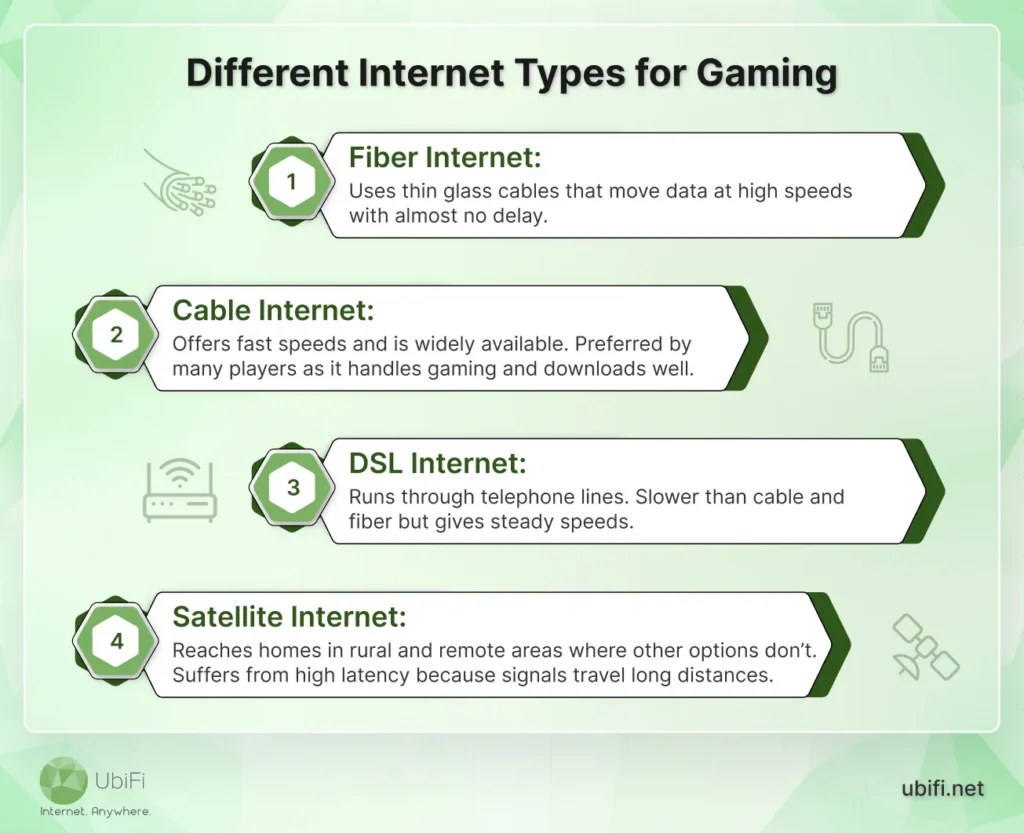
Different Internet Types for Gaming
Before you select the right internet plan for gaming, you need to know how each connection works. Different kinds of internet connections bring their own strengths and limitations.
If you want to learn more about these, you can head over to our online gaming solution, where we’ve discussed them in detail.
Factors That Impact Your Gaming Internet Performance
Your internet speed matters, but it’s not the only thing that affects gameplay. Several other factors can influence how smooth and responsive your games feel. Understanding them can help you troubleshoot and improve your setup.
1. Connection Type
The type of internet connection shapes your gaming experience:
Fiber optic: Fastest option, with speeds up to 1Gbps and very low latency. Performs well even during peak hours.
Cable: Offers good speeds (up to 500 Mbps) but may slow down when many users share the network.
DSL: Slower (20 – 100 Mbps) and higher latency. Works for casual gaming, but competitive games may lag.
2. Bandwidth and Network Congestion
High speed isn’t enough if multiple devices share the network. Streaming videos, downloading files, or video calls can use a lot of bandwidth. Heavy usage or peak-hour traffic may cause lag or stuttering.
3. Ping and Latency
Ping measures how quickly your actions reach the game server. High ping creates delays, making gameplay feel sluggish. Latency can also be affected by distance to the server or your home network setup.
4. Wired vs. Wireless Connection
Wired Ethernet connections are more stable than Wi-Fi. They reduce latency and interference. If you must use Wi-Fi, sit close to the router and use a less crowded channel (5GHz works better than 2.4GHz).
5. Router Quality
Older or low-quality routers may struggle with high-speed connections. Buying a modern router with features like Quality of Service (QoS) can prioritize gaming and reduce lag. Upgrading can answer the question: does a gaming router make a difference, by prioritizing gaming traffic and reducing lag.
6. Server Location
Distance to the game server affects ping. Servers far from your location create delays. Server quality matters too – overloaded or poorly maintained servers can cause lag, regardless of your internet speed.
7. Data Caps and ISP Policies
Some ISPs limit monthly data. Game downloads and updates can hit these caps fast. ISPs may also throttle speeds during high-traffic activities. Choosing a reliable ISP with unlimited data helps avoid interruptions. Using a VPN can bypass throttling, but pick one with low-latency, high-speed servers for smooth gameplay.
To sum up, several factors beyond speed, such as ping, connection type, and network congestion, decide how smooth your games feel. A stable setup, a good router, and the right server location can make a big difference in reducing lag and keeping gameplay responsive.
How to Improve Internet Speed for Gaming?
If games feel sluggish, freeze mid-fight, or take too long to respond, your internet may not be the only culprit. Small changes at home can sharpen your connection and make gameplay feel far smoother. Here are the most effective fixes that actually work.
Use a Wired Connection When You Can
An Ethernet cable can significantly improve your gaming experience. Wired connections are steady, fast, and less prone to interference. If your console or PC is close to the router, plug it in. It instantly reduces lag and keeps your connection stable during intense matches.
Strengthen Your Wi-Fi Setup
If a cable isn’t an option, refine your Wi-Fi environment:
Keep the router in an open, central spot.
Avoid hiding it behind walls or crowded shelves.
Use the 5GHz band for cleaner, faster signals.
Add a mesh system or extender if some rooms get weak coverage.
Small placement changes often make a big difference in signal strength.
Prioritize Gaming Traffic with QoS
Many modern routers include Quality of Service (QoS) settings. It tells your router to give gaming traffic first priority. It helps keep your ping low even when others in your home are streaming, downloading, or hopping on video calls.
Close Background Apps and Devices
Extra devices can drain your bandwidth without you noticing. Shut down cloud backups, downloads, and streaming apps on any device you’re not actively using. It leaves more bandwidth for your game and reduces sudden spikes in lag.
Restart Your Router Occasionally
Routers slow down as small errors build up. A quick reboot clears the errors and refreshes your connection. Some routers have the option to schedule automatic restarts to maintain a steady connection.
Pick the Closest Game Server
Most online games allow you to choose your server region. Choose the server nearest to your location to reduce the distance your data must travel. Shorter distance means lower ping and quicker reactions on screen.
Update Firmware and Device Drivers
Router updates often include performance boosts and security fixes. Updating your PC or console’s network drivers also prevents bugs that cause unstable connections. A few minutes spent updating can help keep your internet connection stable and deliver better speeds.
Reduce Network Congestion at Home
Gaming feels smoother when fewer devices compete for bandwidth. Disconnect idle devices and pause large downloads or updates. Less network traffic means more consistent responses in fast-paced games.
Review Your Internet Plan
Sometimes the issue is with your internet plan. If you live in rural areas, finding the best internet for gaming in rural areas can ensure smooth gameplay, even when multiple people stream, download, or play games simultaneously. Consider unlimited rural internet or high-speed wireless internet rural areas rely on for more consistent gaming.
Use a VPN Only When Needed
A VPN can protect your connection and occasionally find a faster route to certain game servers. It may also help avoid ISP throttling during heavy online activity. Choose a VPN with low-latency servers; otherwise, it can slow things down rather than help.
Overall, small tweaks at home, such as using Ethernet, improving your Wi-Fi setup, or choosing a closer game server, can optimize your connection. If multiple devices are active or your plan is limited, upgrading your internet speed may be the most reliable way to keep your gameplay smooth.
Summing Up
Internet speed plays a significant role in online gaming. It ensures smooth movements and sharper graphics. Fiber is the ideal choice, as most gamers report less lag, fewer frustrations, and even better in-game performance. Cable, DSL, and satellite each serve different needs and have limits you should consider before choosing. When you understand how these connections work, it becomes easier to pick the one that supports the way you play.
Improving your speed at home is just as important. Small changes, like moving your router, using Ethernet, or closing background apps, can make your connection more stable. Features like QoS and server selection help keep your ping low even when your household is busy online.
If your current connection can’t keep up, upgrading your plan is often the best way to improve your gaming experience. And if you live in rural or underserved areas, you can explore UbiFi’s plans.
FAQs on Good Internet Speed for Gaming
Is 1 Gig overkill for gaming?
A 1 Gig connection isn’t overkill if you want the smoothest gaming possible. It gives you more than enough speed, even when your home has multiple Wi-Fi devices. The extra capacity keeps your ping steady and prevents lag during busy hours. It also ensures that your game doesn’t slow down as it grows larger and updates get heavier.
Is 100Mbps fast enough for gaming?
Yes, 100Mbps is generally fast enough for gaming. It can handle real-time multiplayer play, steady voice chat, and smooth updates. Even with several people online, the connection stays stable. You can stream, browse, and play games simultaneously without slowdowns. For most homes, 100Mbps works well for everyday gaming needs.
How many Mbps do you need for gaming?
Most games run well with 25 Mbps download and 5 Mbps upload. A steady connection matters more than high speed, so using Ethernet and keeping your network clear of extra devices helps a lot.
How much internet speed do I really need for gaming?
For smooth online gaming, you generally need at least 25 Mbps download and 5 Mbps upload. However, speed alone isn’t everything. What matters most is low latency, with a ping under 50 ms, and a stable, consistent connection. Competitive or multiplayer gaming benefits from speeds of 50 to 100 Mbps or higher, especially if multiple devices are connected at home. If you use cloud gaming, like Xbox Cloud or GeForce NOW, aim for 50 to 150 Mbps for the best performance.
Kevin Peterson
Kevin Peterson is a telecommunications expert and proud Chicago native with over a decade of industry experience. He’s passionate about expanding internet access and improving infrastructure, especially in underserved communities. Committed to bridging the digital divide, Kevin believes everyone deserves reliable connectivity in today’s digital world.
Internet That Moves With You — Plans Begin at $89.99/mo
Stay online from rural areas or anywhere on the road.