How to Reduce Buffering for a Smooth Streaming Experience
Quick Summary
Buffering occurs when your device cannot receive streaming data quickly enough, usually due to slow internet speeds, weak WiFi signals, or limited bandwidth.
Ensuring a good internet speed and meeting the required Mbps for streaming is essential for smooth, uninterrupted video playback.
Reducing video quality, closing background apps, and limiting the number of connected devices can significantly decrease buffering during streaming.
Optimize the setup by using wired connections, updating devices, and improving WiFi strength to maintain a stable, buffer-free experience.
Kevin Peterson
11Minutes to read
Table of Contents
There’s nothing more frustrating than settling in for your favorite show, only to be greeted by the spinning wheel of doom. Years of experience in streaming technology show that buffering is annoying, and it interrupts the flow of entertainment and makes even the most exciting scenes feel dull. Buffering indicates that the device isn’t receiving data fast enough.
Many users ask, “How do you reduce buffering?” The answer lies in small but effective adjustments, such as optimizing network connections, lowering video quality, or tweaking device settings. Whether streaming on a laptop, smart TV, or Fire TV Stick, these solutions can significantly reduce buffering during playback.
This blog provides easy-to-follow steps to reduce buffering while streaming. We will explain why videos stall and share specific tips for a smoother, uninterrupted viewing experience. Let’s dive in!
What is Buffering?
Internet Buffering occurs when a device temporarily stores small portions of a video, audio, or live stream before playing it. Streaming doesn’t send the entire file at once; instead, it downloads data in chunks and keeps them in a temporary memory called a buffer. This allows playback to stay smooth, even if the internet speed fluctuates.
Without this buffer, videos would constantly stop and start, making it nearly impossible to enjoy online content. The familiar spinning wheel or loading bar appears when the buffer runs out because the connection cannot supply data fast enough.
Common Causes of Buffering
Buffering can disrupt the entire streaming experience. Understanding the root causes is the first step toward a smoother playback. It may seem random, but most buffering issues arise from predictable factors related to the internet, devices, or settings.
Slow or unstable internet connection: The most obvious cause of buffering is a slow internet connection. Streaming videos rely on a steady data flow, and if the connection cannot deliver the required Mbps for streaming, the device pauses playback to catch up. Even minor drops in speed can trigger the spinning wheel.
Network congestion: When many devices use the same network at once, data slows down. Network congestion can cause videos or live streams to pause frequently, especially in households with several users streaming or gaming simultaneously.
Weak WiFi signal: Physical obstacles like walls, floors, or even appliances can weaken a WiFi signal. A weak signal breaks the steady flow of data, forcing the device to pause playback to refill the buffer. Using a wired connection or moving closer to the router often improves performance and reduces buffering.
Device limitations: Older phones, tablets, or streaming boxes may struggle to handle high-quality streams, especially if multiple apps are running in the background. Limited processing power can make even a strong internet connection seem slow.
Video quality settings: Higher resolution videos, such as 4K or HD, require more data to stream. If the connection cannot handle the increased demand, buffering occurs. Adjusting video quality to match available bandwidth can prevent interruptions and maintain smooth playback.
Outdated equipment: Routers and modems several years old may not efficiently support modern streaming demands. Buffering is one of the signs you need a new router. Using updated devices ensures better data handling, stronger signals, and overall faster response times.
Understanding these causes will help in reducing buffering while streaming. Ensuring the right combination of good internet speed, capable devices, and optimized settings will ensure the streaming experience is smooth and uninterrupted. And if you live in remote areas and want high-speed internet for buffer-free streaming, you can opt for our rural internet services.
How to Reduce Buffering While Streaming
To reduce buffering, ensure the device can receive and process data smoothly. Most interruptions happen due to slow internet, device limitations, or streaming settings. Addressing these areas with simple, practical steps will help improve the streaming experience.
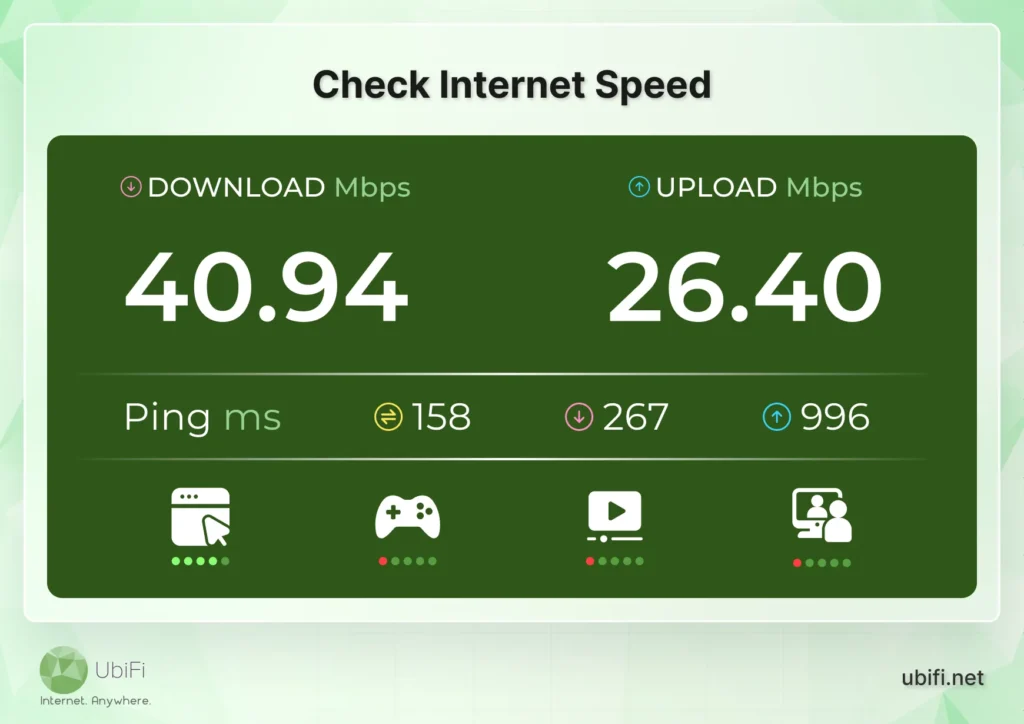
Check Internet Speed
Streaming requires a steady connection that meets the required Mbps. Running a speed test helps determine if the internet can handle HD or 4K content. Connections below the recommended speed often cause frequent pauses and interruptions. If speeds are low, contact your ISP or upgrade your plan for smooth playback.
Limit Network Usage
When multiple devices use the same network, bandwidth gets divided among them. Streaming, gaming, or large downloads on other devices can slow your connection. Temporarily disconnecting unused devices or asking others to pause heavy activities to ensure your device receives enough bandwidth to play content without interruption.
Use a Wired Connection
WiFi signals can fluctuate due to interference from walls, electronics, or other networks. Switching to a wired Ethernet connection provides a stable, direct link to your router. This eliminates most wireless disruptions and ensures consistent speeds that support uninterrupted streaming, especially for data-intensive HD or 4K videos.
Boost WiFi Signal
WiFi signal strength is crucial for smooth playback. Position the router centrally, away from walls, floors, and electronic devices that can interfere with the signal. Using WiFi extenders or mesh networks enhances coverage and improve WiFi speed, ensuring your device receives a steady flow of data without buffering interruptions.
Restart Router and Device
Routers and devices can develop small glitches or memory build-up over time. Restarting them fixes these issues and refreshes the connection. Even brief power cycles can resolve hidden slowdowns in both your device and network, reducing the chances of repeated buffering during streaming sessions.
Close Background Apps and Tabs
Applications running in the background often consume bandwidth and processing power, even when idle or minimized. Streaming requires both sufficient network resources and device performance. Closing unnecessary apps ensures the device prioritizes the video or audio stream, reducing the risk of pauses and stuttering.
Adjust Video Quality
High-resolution streams, such as 1080p or 4K, demand more data than most standard connections can handle. Lowering the video quality reduces the data required, helping videos play without pauses. Many streaming platforms allow easy adjustments in the player settings, which can make a noticeable difference, especially on slower connections.
Update Apps and Device Software
Old streaming apps or device firmware can cause slow performance issues or compatibility problems that slow down data processing. Regular updates fix bugs, optimize playback, and ensure smooth compatibility with current streaming technology. Keeping software up-to-date is an easy yet often overlooked step to reduce buffering.
Pause to Allow Buffering
When a video keeps pausing, stopping the stream briefly lets more content load into the buffer. This preloading ensures that playback can continue without interruptions. For slow connections or large files, pausing for a few seconds can greatly reduce repeated stops and improve the viewing experience.
Upgrade Outdated Equipment
Routers and streaming devices from several years ago may struggle to handle modern high-definition content. Upgrading to a new router or device ensures faster speeds, stronger signals, and the ability to efficiently manage multiple devices on the same network. This reduces buffering caused by outdated hardware limitations.
Check VPN or Proxy Settings
VPNs and proxies can slow down streaming because each data packet must be encrypted and routed through a remote server. Using an outdated VPN or one not optimized for streaming can increase buffering. Testing the connection without a VPN or using a streaming-friendly VPN can improve data flow and reduce interruptions.
By applying these strategies, buffering can be minimized or eliminated, allowing uninterrupted streaming and a more enjoyable viewing experience. Simple adjustments to network usage, device management, and settings often make the biggest difference.
Can’t find the root cause of buffering while streaming?
Buffering is a common frustration when streaming. But it is also one of the most manageable. Most buffering occurs due to slow or unstable internet, network congestion, weak WiFi signals, outdated devices, or high video quality settings.
By understanding these causes and applying practical solutions, including checking internet speed, using a wired connection, optimizing device performance, and adjusting video quality. These will help viewers regain control over their streaming experience. Small changes can make a big difference.
If you want a faster internet connection to enjoy uninterrupted streaming, check out our plans today!
FAQs on Reducing Buffering
Does VPN stop buffering?
A VPN can help in certain cases, especially if your internet service provider slows down streaming. By routing your data through another server, you may bypass these slowdowns. However, a poorly optimized VPN can also reduce speed. For best results, use a VPN designed for streaming.
Will a better router help with buffering?
Yes, a modern router can significantly reduce buffering. Newer routers support higher speeds, manage multiple devices better, and offer stronger Wi-Fi coverage. Features like dual-band or WiFi 6 improve signal stability, helping maintain a steady data flow during streaming.
Does clearing the cache stop buffering?
Clearing the cache can help if buffering is caused by an overload of temporary files in your browser or streaming app. Over time, cached data can slow down performance and delay video loading. Removing it refreshes the app or browser, allowing it to process streaming data more efficiently.
Kevin Peterson
Kevin Peterson is a telecommunications expert and proud Chicago native with over a decade of industry experience. He’s passionate about expanding internet access and improving infrastructure, especially in underserved communities. Committed to bridging the digital divide, Kevin believes everyone deserves reliable connectivity in today’s digital world.
Internet That Moves With You — Plans Begin at $89.99/mo
Stay online from rural areas or anywhere on the road.