Has it ever happened to you that the internet is fast across your house, but the speed drops drastically when you’re in a particular spot? Such situations can freeze an important Zoom call, make it difficult to stream a movie, and do many other things. WiFi dead zones are a common problem in households, be it a small apartment or a large suburban home.
Most people try to fix it with a quick solution. They buy a WiFi extender. Or they hear about mesh WiFi systems and wonder if that’s a better choice. Many even think that these are the same devices. But they’re not. They work in very different ways. Choosing the wrong one can waste your money and still leave you with weak signals.
In this blog, we’ll compare mesh WiFi vs extender and learn how they work, where they perform best, and which one fits your home setup. Let’s start!
What is Mesh WiFi?
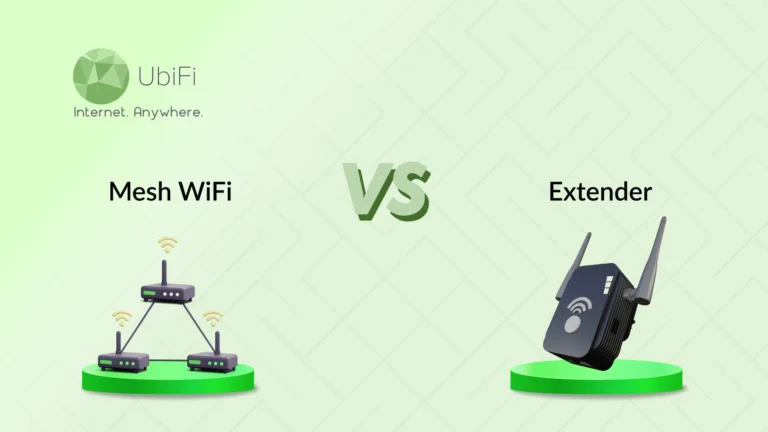
Mesh WiFi is a home network system that uses multiple devices, called nodes, to spread WiFi evenly across an area. Instead of relying on one router, these nodes work together as a single network. One node connects to your modem, while the others sit in different rooms to improve coverage. All nodes share the same network name, so your phone or laptop automatically connects to the strongest signal as you move around.
The nodes communicate with each other through a private link known as backhaul, which can be wired or wireless. Smart software constantly checks traffic and signal strength, then chooses the best path for your data. This keeps your connection smooth and stable.
Pros and Cons of Mesh WiFi
Below are some pros and cons of mesh WiFi:
Pros
- Whole-home coverage: Mesh systems spread WiFi evenly across your house. So there will be no dead zones in bedrooms or basements.
- Seamless roaming: Your devices switch between nodes on their own. You stay connected as you move around.
- Smart traffic handling: The system picks the best path for your data. This keeps speeds steady during heavy use.
- Easy control: Most systems use simple apps. The settings are easy to manage.
- Scalable design: You can add more nodes anytime. Perfect if you move to a bigger place.
Cons
- Higher cost: Mesh systems cost more than basic routers or extenders.
- Speed drops on wireless backhaul: If nodes communicate wirelessly, speeds may drop with distance.
- Needs careful placement: Poor node placement can weaken performance.
- Limited advanced settings: Some systems restrict deep customization.
- Overkill for small homes: A single router may work fine in tight spaces.
In short, mesh WiFi uses multiple nodes to provide seamless coverage and consistent speeds under a single network name. While it effectively removes dead zones, it is more expensive than standard routers and requires strategic node placement.
What is WiFi Extender?
A WiFi extender is a small device that boosts your existing WiFi signal to reach weak areas in your home. It works by picking up the signal from your main router and rebroadcasting it farther, like a relay station. It is supposed to be placed between your router and the dead zone, where the signal is still strong.
Technically, it connects wirelessly to your router and creates a second access point, sometimes with a slightly different network name. Your data makes two trips, from your device to the extender, then to the router. Newer extenders use dual-band radios to handle traffic better and reduce slowdowns.
Pros and Cons of a WiFi Extender
Below are some of the pros and cons of a WiFi extender.
Pros
- Low cost: Extenders are budget-friendly. They are a simple fix for weak signals.
- Quick setup: Most models plug into a wall outlet and connect in minutes.
- Improves reach: They push WiFi into corners your router can’t cover.
- No new network needed: Extenders work with your current router.
- Compact size: Small design so it does not occupy much space.
Cons
- Speed loss: Data takes an extra hop which can reduce the speed.
- Separate network names: Some extenders create a second WiFi name.
- Placement sensitive: Wrong location means poor performance.
- Limited coverage: One extender covers only a small area.
- Not ideal for heavy use: Streaming and gaming may still lag.
Simply put, a WiFi extender is a budget-friendly device that rebroadcasts your existing signal to remove dead zones in specific rooms. While easy to set up with current hardware, it can reduce your speeds and often requires manual network switching as you move around.
The Key Differences Between Mesh WiFi vs WiFi Extender
Below is a detailed comparison of mesh WiFi and extender based on key parameters. It will help you understand how they differ and how to choose the better option.
Performance
- Mesh WiFi: Mesh systems deliver stable speeds across your home. Each node shares the load and routes data smartly. This reduces lag during streaming or calls. Even with many users, performance stays smooth.
- WiFi Extender: WiFi extenders repeat the signal, but data takes an extra step. This often causes speed drops. The farther you go, the weaker it feels. Heavy tasks may show delays.
Verdict: Mesh WiFi wins for consistent, reliable performance.
Cost
- Mesh WiFi: Mesh systems come with a higher upfront price. You’re paying for multiple nodes and advanced software. Most brands sell them in packs, which increases the cost. Still, you get a complete home solution in one setup.
- WiFi Extender: WiFi extenders are much cheaper and easy to find. There’s no need to replace your router. It’s a quick fix for minor coverage issues.
Verdict: WiFi extenders win on price, but mesh offers better long-term value.
Coverage
- Mesh WiFi: Mesh systems spread signal evenly across your entire home. Each node fills in weak spots, leaving no room without internet. Even garages and patios get solid coverage.
- WiFi Extender: An extender boosts one specific area. It doesn’t fix the whole house. Large homes may need several units. Coverage can feel uneven.
Verdict: Mesh WiFi provides wider and more balanced coverage.
Connectivity While Moving
- Mesh WiFi: Mesh systems create a single unified network across your home. As you move from room to room, your phone or laptop automatically switches nodes. The handoff is smooth and instantaneous, ensuring no lag or delay.
- WiFi Extender: Most WiFi extenders act like a separate access point. Some even use a different network name. Your device often stays locked to a weak signal instead of switching to the extender, resulting in poor internet performance. You may have to switch networks manually.
Verdict: Mesh WiFi offers far better connectivity while roaming with zero interruptions.
Ease of Use
- Mesh WiFi: Mesh systems are designed for everyday users. Setup happens through a guided mobile app. The steps are clear. You can see connected devices, pause WiFi, and add new nodes in seconds. Firmware updates are also automatic.
- WiFi Extender: WiFi extenders are easy to plug in but hard to place correctly. You often need trial and error to find a good spot. Settings are basic, but some models lack apps.
Verdict: Mesh WiFi is simpler, smarter, and easier to control.
Device Handling
- Mesh WiFi: Mesh systems are built for modern homes and can manage many devices at once. Traffic is spread across nodes, preventing overload. Each device gets steady bandwidth, and performance stays balanced even during peak hours.
- WiFi Extender: WiFi extenders have limited capacity. When many devices connect, speeds drop very quickly. Streaming buffers, game lag, and smart devices disconnect. It has no intelligent traffic control.
Verdict: Mesh WiFi handles multiple devices with far more stability.
Mesh WiFi vs WiFi Extender: Which One Should You Choose?
Now that you know the differences between mesh WiFi and extenders, you can choose the better option for your needs. Below are some ideal cases for choosing them:
Choose Mesh WiFi if:
- You have a large home or multiple floors with WiFi dead zones.
- You need strong, stable speeds for streaming, video calls, or gaming.
- Your home has many devices running at the same time.
- You want seamless roaming between rooms without interruptions.
- You prefer easy control and monitoring through a mobile app.
- You want a long-term, scalable solution that can grow with your home.
Choose WiFi Extender if:
- You have a smaller home or just a few weak WiFi spots.
- You want a low-cost, quick fix without replacing your router.
- You don’t need advanced traffic management or seamless roaming.
- Your device count is low, and heavy usage is rare.
- You’re okay with slightly slower speeds in extended areas.
Choose the one that suits your needs better and experience high-speed internet. If the budget allows, we recommend choosing a mesh WiFi setup, as it is a more advanced and flexible solution for long-term usage.
Closing Lines
Choosing the right WiFi solution comes down to your home, devices, and internet needs. Mesh WiFi is ideal for larger homes, multiple devices, and seamless coverage from room to room. It offers stable speeds, smart traffic management, and easy control through an app.
WiFi extenders, on the other hand, are a budget-friendly way to fix small dead zones. They’re quick to set up and work well in smaller spaces or for light internet use. Understanding the differences helps you avoid frustration and wasted money.
Whether you need the full coverage and smart features of a mesh system or a simple extender to boost your signal, there’s a solution that fits your needs. And if you’re looking for a reliable internet option for your home, then explore our plans to get the best deal.
FAQs on Mesh WiFi vs WiFi Extender
How far does mesh WiFi reach?
Each node typically covers 1,500-2,500 square feet, depending on the model and house layout. Adding extra nodes extends coverage further for large or multi-story homes.
Does mesh WiFi go through walls?
Yes, mesh WiFi can pass through walls, but thick walls or metal structures can reduce signal strength. Placing nodes strategically helps maintain strong coverage throughout your home.
Can I use mesh as a WiFi extender?
Yes, a mesh system can replace a traditional WiFi extender and usually performs much better. Even one mesh node can extend coverage from your main router, but the real benefit comes from using multiple nodes together. Mesh systems function as one coordinated network, automatically managing traffic and signal strength so your devices stay connected without manual switching.
Is a WiFi mesh better than an Extender?
Yes, in most cases, mesh WiFi is better than a traditional WiFi extender. Mesh systems create a single network that covers your entire home, letting devices switch automatically to the strongest signal. This leads to smoother connections, better speeds, and fewer dropouts. Extenders, on the other hand, often create separate networks. They can reduce speeds and work best for fixing a small, isolated dead zone.
Do WiFi extenders work with mesh WiFi?
WiFi extenders can technically be used alongside a mesh network, but it’s not recommended. Extenders don’t integrate with mesh systems and often create separate networks that cause slowdowns or dropped connections. For the best performance, it’s better to add additional mesh nodes from the same system, as they are designed to communicate efficiently and support seamless roaming.
Does a WiFi mesh slow down internet speed?
A mesh WiFi system can slightly reduce speeds because data may pass through multiple nodes before reaching your device. Each wireless “hop” uses some bandwidth, especially without a wired backhaul. However, modern mesh systems are designed to minimize speed loss, and they usually perform much better than extenders by eliminating dead zones and maintaining stable connections throughout the home.
What is a major disadvantage of a mesh network?
The biggest drawback of a mesh network is cost. Mesh systems need multiple nodes, making them more expensive than a single router or basic extender. Setup can also be more complex, and poor node placement may lower performance. While mesh networks offer excellent coverage and reliability, they might be unnecessary for small spaces with simple connectivity needs.
When should I choose a WiFi extender instead of mesh?
A WiFi extender makes sense if you live in a small home or apartment and have only one weak area, like a back bedroom or garage. Extenders are affordable, easy to set up, and work well for basic needs such as browsing or light streaming. However, if you have multiple floors, many devices, or frequent connectivity issues, a mesh system will provide a more consistent experience.
Sidra Jefferi
Sidra Jefferi is the Marketing Director at UbiFi with deep expertise in corporate actions and a strong understanding of both international and domestic markets. She combines her analytical skills and attention to detail with strategic marketing leadership to help expand UbiFi’s mission of delivering reliable internet to rural and underserved communities.