What’s a Good Internet Speed for Gaming? Your Complete Setup Guide
Quick Summary
A good speed for gaming blends bandwidth, low ping, and stable latency.
Target 25 Mbps download and 5 Mbps upload per gamer minimum.
Keep ping under 50 ms; steady latency beats raw speed.
Games run smoothly for most homes on 100 Mbps; busy homes want 200.
Ethernet, QoS, and nearby servers cut lag better than speed alone.
Sidra Jefferi
13Minutes to read
Table of Contents
Gaming is more than a hobby. It helps us relax our minds and improves our ability to focus. But lag or sudden disconnects can ruin the experience. Whether you play EA FC, Counter-Strike 2, Minecraft, or GTA, success depends on quick moves, teamwork, and smooth reactions. For this, you need a stable internet connection with good speed.
Many gamers buy powerful hardware like graphics cards and processors, but ignore the internet connection. If the internet is slow, you’ll experience lag regardless of your gaming setup.
In this blog, we’ll learn what determines a good internet speed for gaming on PCs, consoles, and smartphones. Let’s dive in!
What is a Good Internet Speed for Gaming?
A good gaming experience depends on adequate download speed, reliable upload, and low latency. The best internet speed for gaming combines enough bandwidth, stable speed, and low ping, not just a high speed-test number.
Most games run at low speeds. Casual games perform well on 3–8 Mbps download and 1–3 Mbps upload, but that’s the bare minimum, and it worsens when other devices eat up bandwidth. For smooth play, aim for 100–200 Mbps, or more for homes with multiple consoles, PCs, and streams.
Download speed: 15–25 Mbps per device supports fast movement, voice chat, and steady frames, even with several devices connected.
Upload speed: 3–5 Mbps suits most players; streamers and eSports players benefit from more.
Latency (Ping): Stay under 50 ms. This matters more than raw speed. A wired connection and updated drivers can improve latency.
On a 100 Mbps plan, a 25 Mbps game leaves 75 Mbps for everyone else, easily consumed at home. For most households, 100 Mbps or higher keeps everyone lag-free.
Different devices need different speeds to perform their best. Here’s a quick guide to help you understand what each type of gaming setup requires:
Device Type
Recommended Download Speed
Recommended Upload Speed
Important Factors for Gaming
PC (Desktop/Laptop)
10–25 Mbps
3-5 Mbps
Competitive and multiplayer games benefit most from low-latency, wired Ethernet.
Consoles (PlayStation, Xbox, Nintendo Switch)
10–25 Mbps
3-5 Mbps
Use Ethernet or 5 GHz WiFi for stable multiplayer; enable QoS when devices share the network.
Mobile Devices
5–10 Mbps
1-3 Mbps
A strong WiFi or 5G connection works best; close background apps to free up bandwidth.
Handheld Consoles
5–10 Mbps
1-3 Mbps
A stable WiFi connection is usually enough; avoid heavy downloads while gaming.
VR Headsets
25–50 Mbps
5-10 Mbps
Wireless VR needs high bandwidth and very low latency, so use 5 GHz or WiFi 6.
Understanding the Different Gaming Needs
Not all households need the same speed. How you play decides the bandwidth and stability you require.
Casual gamers: Games like Minecraft, Roblox, and Mario Kart use little bandwidth. A stable connection matters more than high speeds, so a basic plan works fine.
Competitive gamers: Fast-paced games like Counter-Strike 2, Call of Duty, and Apex Legends demand low latency. Higher speeds keep ranked matches responsive.
Streamers & eSports pros: Streaming, uploading, and large sessions need more bandwidth and consistent upload speeds.
Multiple devices: Shared connections drop performance. Homes with several active users should aim for at least 50 Mbps.
Understanding how speed, latency, and bandwidth work together makes it easier to compare gaming internet plans.
Internet Speed Terms for Gamers
A few key terms every gamer should know:
Latency (ms): The delay between your action and the game’s response. Low latency keeps the play smooth; high latency causes stutters and rubber-banding.
Download Speed (Mbps): How fast data reaches your device. It affects install and update times and how smoothly games run.
Upload Speed (Mbps): How fast your device sends data out. It affects voice chat, online matches, and how quickly your actions reach the server.
Ping (ms): The metric that measures latency via round-trip time. Low ping means instant reactions; high ping delays shots and movement.
Together, these decide how fast your game loads, how quickly your actions register, and how smooth play feels. In remote areas, the best internet for rural gaming ensures low latency and stable speeds.
How Much Speed Do You Actually Need for Gaming?
Gaming rarely demands heavy bandwidth during a match, as most games send small packets back and forth. A good internet speed for gaming is determined by an ideal mix of download speed, upload speed, and latency. Below is what each factor requires:
The Download Speed That Keeps You Competitive
Download speed handles everything arriving at your device: game data, player actions, updates, and environment details.
Gamer type
Recommended download
Casual / solo
10–25 Mbps
Competitive
25–100 Mbps
Streamer / multi-device home
100+ Mbps
Cloud gaming (GeForce NOW, Xbox Cloud)
10–20 Mbps, stable
A single gamer runs fine on 25 Mbps. Add a roommate streaming 4K and a few phones, and you’ll need more speed to keep everything running smoothly.
How Download Speed Translates to Wait Time
Speed matters most when a new release drops and you’re staring at a progress bar. Here’s how long a 100 GB game takes at each tier:
The upgrade from 10 Mbps to 100 Mbps turns an overnight wait into a coffee break.
What Upload Speed Really Does for You
Upload speed sends your data out: your actions, voice chat, and cloud saves. Regular gaming needs little, but content creation changes the math.
Activity
Upload target
Standard online play
3–5 Mbps
Voice chat + party play
5–10 Mbps
Twitch / YouTube streaming
15–25 Mbps
Cable plans often cap upload at around 35 Mbps and struggle with 4K streaming. You can solve this with Fiber’s symmetrical speeds.
Latency: The Number That Beats Raw Speed
Latency is the delay between your input and the server’s response, measured in milliseconds. No amount of Mbps fixes high ping.
Ping range
Experience
Under 20 ms
Ideal for competitive FPS
20–40 ms
Smooth, responsive play
Under 50 ms
Solid for most games
Over 100 ms
Noticeable lag, rubber-banding
A 300 Mbps fiber line at 12 ms beats a 900 Mbps cable line at 45 ms in any fast-paced game. When every click matters, lower latency gives you the edge.
Gaming Within the Whole-House Budget
Gaming is rarely the only use case for your internet. Streaming, video calls, downloads, and smart devices all draw from one connection, as this household usage guide shows:
Household
Suggested plan
1 gamer, light use
25–50 Mbps
2–3 users, some streaming
100 Mbps
Multiple gamers + streamers
300 Mbps to Gigabit
Pro Tip
Set a budget of 25 Mbps per person, more when others stream in 4K. For most homes, 100 Mbps is the sweet spot. A router with Quality of Service (QoS) settings lets you prioritize gaming traffic when bandwidth gets tight.
Speed and latency tell only half the story, though. The connection type feeding your home shapes both, so here’s how the main options stack up.
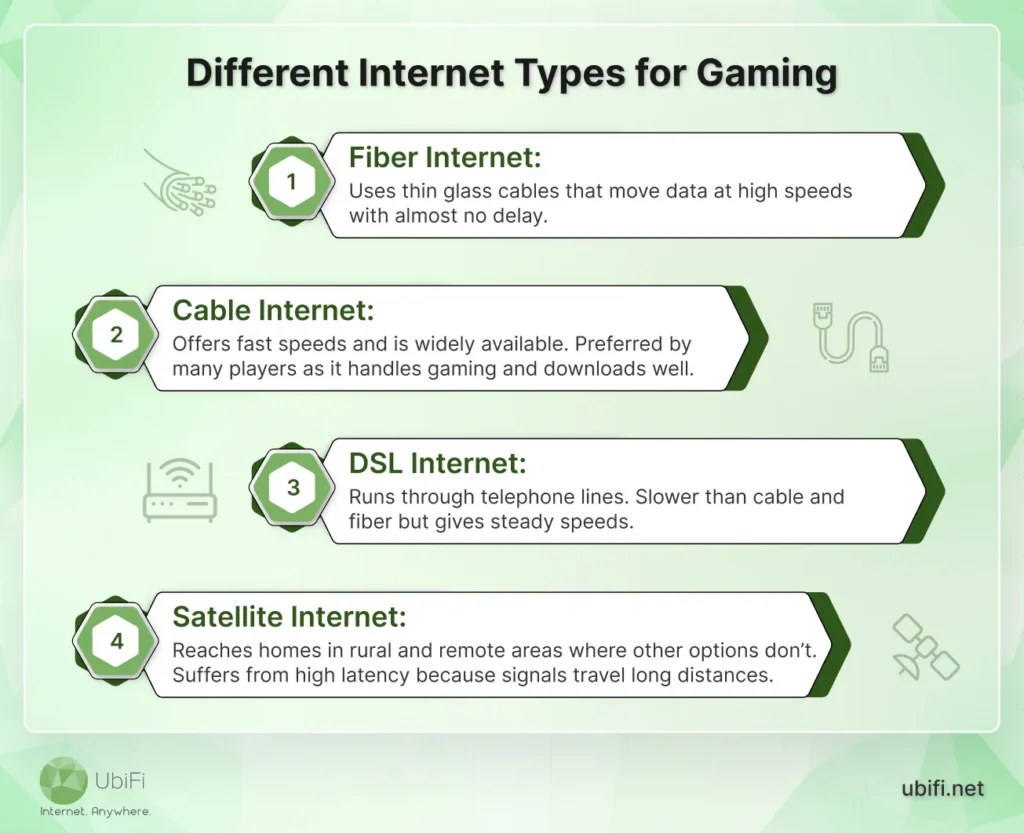
Different Internet Types for Gaming
Before you select the right internet plan for gaming, you need to know how each connection works. Different kinds of internet connections bring their own strengths and limitations.
If you want to learn more about these, you can head over to our online gaming solution, where we’ve discussed them in detail.
Factors That Impact Your Gaming Internet Performance
Speed matters, but it’s not the only thing shaping gameplay. Several other factors decide how smooth and responsive your games feel.
Connection type:
Fiber is fastest (up to 1 Gbps) with very low latency, even at peak hours.
Cable performs well (up to 500 Mbps) but slows when shared.
DSL (20–100 Mbps) has higher latency and may lag in competitive games.
Network congestion: High speed won’t help if streaming, downloads, or video calls flood the network. Peak-hour traffic causes lag and stuttering.
Wired vs. wireless: Ethernet is more stable than WiFi, cutting latency and interference. On WiFi, stay near the router and use 5GHz over 2.4GHz.
Router quality: Older routers struggle with fast connections. A modern router with QoS prioritizes gaming traffic and reduces lag.
Server location: Distant or overloaded servers raise ping, no matter your speed.
Data caps: Game downloads hit monthly limits fast, and some ISPs throttle heavy traffic. Choose unlimited data for uninterrupted play.
To sum up, several factors beyond speed, such as ping, connection type, and network congestion, decide how smooth your games feel.
How to Improve Internet Speed for Gaming
If games freeze or feel sluggish, small changes at home can sharpen your connection.
Go wired: An Ethernet cable is steady, fast, and interference-free. If your console sits near the router, plug it in for instant lag reduction.
Strengthen WiFi:Keep the router central and unobstructed, use the 5GHz band, and add a mesh system for weak-coverage rooms.
Enable QoS: Set your router to prioritize gaming traffic, keeping ping low while others stream or download.
Free up bandwidth: Close cloud backups, downloads, and streaming apps on idle devices. Disconnect anything you’re not using.
Restart your router: A quick reboot clears built-up errors and refreshes the connection. Schedule automatic restarts if available.
Pick the closest server: A nearby game server shortens the distance your data travels, lowering ping.
Update firmware and drivers: Router and network driver updates fix bugs that cause unstable connections.
Review your plan: Align your internet usage with your network plan to ensure that it satisfies your gaming, streaming, and browsing needs.
Use a VPN only when needed: A low-latency VPN can dodge throttling; a slow one hurts more than helps.
Overall, small tweaks at home, such as using Ethernet, improving your WiFi setup, or choosing a closer game server, can optimize your connection.
Matching UbiFi Plans to Your Gaming Setup
UbiFi runs on unlimited 4G LTE and 5G fixed wireless, built for rural homes where fiber and cable don’t reach. Here’s how each UbiFi plan tier aligns with real gaming demand:
Plan
Speed
Price
Best fit
4G Data
Up to 25 Mbps
$89.99/mo
Casual solo play; slows after 300 GB
5G Unlimited
Up to 100 Mbps
$99.99/mo
Most gamers. Multiplayer + household use
5G Unlimited
Up to 200 Mbps
$129.99/mo
Multiple gamers + streamers + busy homes
Each plan has a one-time $25 activation fee, and routers are leased for free or sold for $349.99.
For rural gamers, it comes down to how many users share the line. Solo players do well on 100 Mbps; busy households want 200 Mbps for steadier play.
That’s what ties the whole picture together, so here’s the bottom line on picking the right speed.
Summing Up
Internet speed plays a major role in online gaming, driving smoother movement and sharper graphics. Fiber is the ideal pick, with most gamers reporting less lag and better in-game performance. Cable, DSL, and satellite each have limits worth weighing before you commit.
Home tweaks matter just as much. Moving your router, switching to Ethernet, or closing background apps steadies your connection, while QoS and smart server selection keep ping low on a busy network.
FAQs on Good Internet Speed for Gaming
Is 1 Gig overkill for gaming?
For the game itself, yes. But in busy homes with many devices, streamers, or heavy 50–150 GB downloads, that extra capacity keeps ping steady and cuts wait times.
Is 100Mbps fast enough for gaming?
Yes. 100 Mbps handles multiplayer, voice chat, and updates while others stream or browse. For most households, it’s the practical sweet spot for lag-free everyday gaming.
How many Mbps do you need for gaming?
Most games run well on 25 Mbps download and 5 Mbps upload. A stable connection matters more than raw speed, so wired Ethernet beats a higher WiFi speed.
How much internet speed do I really need for gaming?
25 Mbps down and 5 Mbps up is the baseline, but a sub-50 ms ping matters more. Competitive play wants 50–100 Mbps; cloud gaming needs 50–150 Mbps.
Sidra Jefferi is the Marketing Director at UbiFi with deep expertise in corporate actions and a strong understanding of both international and domestic markets. She combines her analytical skills and attention to detail with strategic marketing leadership to help expand UbiFi’s mission of delivering reliable internet to rural and underserved communities.
Internet That Moves With You — Plans Begin at $89.99/mo
Stay online from rural areas or anywhere on the road.